
Sub-Total: $0.00
How to Upgrade Your GM Dash Cluster Easily and Quickly
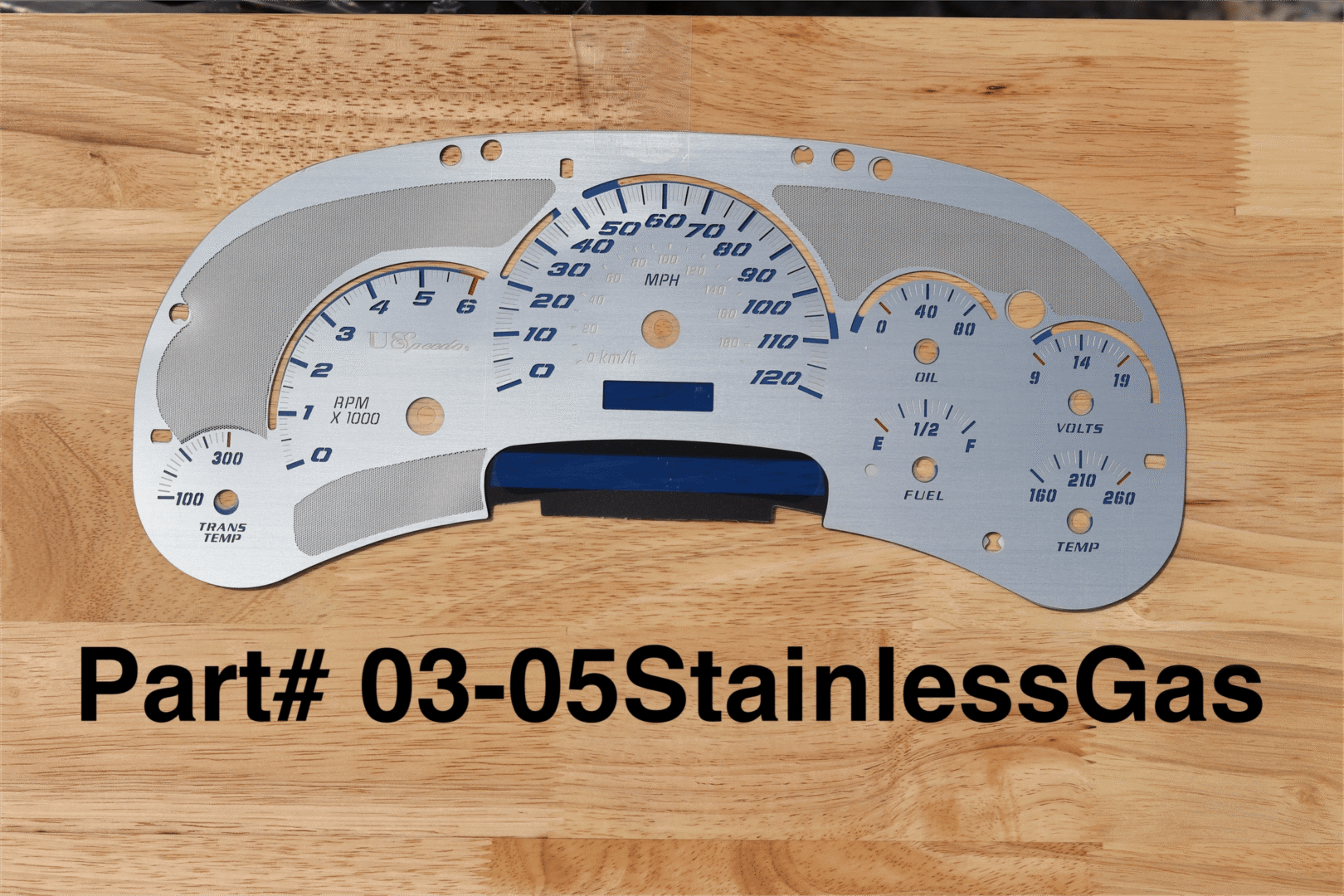

Upgrading your GM dash cluster is a smart way to fix common issues while giving your vehicle’s interior a clean, modern look. Whether it’s dim gauges, stuck needles, or just an outdated display, custom upgrades like LED lighting, chrome rings, and specialty faces can make your dashboard more functional and easier to read.
With Digitech Auto Solutions, you get fast, factory-trained service without the dealer markup. From Silverado to Yukon, we handle everything from simple upgrades to full repairs—with same-day turnaround and video proof before you pay, so you know exactly what’s been done.
If you own a GM truck or SUV and want your cluster working and looking its best, now’s the perfect time to upgrade. Start your dash upgrade today with Digitech Auto Solutions—just fill out our Service Order Form and ship your cluster in.
Understanding Your GM Dash Cluster
Knowing the type, model, and compatibility of your GM dash cluster helps you pick the right upgrades and avoid costly mistakes. You’ll learn how to identify your cluster and understand what works with your vehicle.
Common GM Dashboard Types
GM trucks and SUVs often come with one of three main types of dash clusters:
- Analog clusters: These use physical needles and dials for speed, fuel, and temperature. They are found in many Silverado, Sierra, and Tahoe models from the early 2000s to around 2015.
- Digital clusters: These display information on digital screens with customizable layouts.
- Hybrid clusters: These combine analog gauges with small digital readouts, offering more info but keeping classic styling.
Most upgrades and repairs happen on analog or hybrid types. Digital upgrades usually need special programming.
Identifying Your Cluster Model
Your cluster model number is key to ordering the right parts or upgrades. It’s usually stamped or printed on the back or side of the unit. You might see codes like LVDF, DIC, or CCK on older GM clusters.
You can also check your vehicle’s manual or use your VIN to find cluster info online or at a dealership. Clusters can vary even within one make or year due to trim packages.
Having the exact model ensures any new gauges, LED upgrades, or repaired units fit your dash perfectly.
Compatibility Considerations
Not every cluster fits every GM truck or SUV. Consider your vehicle’s year, make, model, and transmission type when upgrading your dash. Some clusters have extra functions like oil pressure or battery voltage that older or basic models may lack.
If you want to add LED lighting or custom faces, make sure those options match your specific cluster model. Some upgrades require professional recalibration or programming.
When in doubt, send your cluster to specialists like us who confirm fit and function before you pay. For reliable cluster repair and upgrades, check professional instrument cluster repair and cluster upgrades.
Essential Tools and Preparations
Before you start upgrading your GM dash cluster, gather the right tools, set up a clean workspace, and follow safety steps. These will help make the job easier and prevent damage to your vehicle or parts.
Gathering the Right Tools
You’ll need a few basic tools to remove and install your dash cluster. Start with a set of screwdrivers—both flathead and Phillips. Some GM models also require Torx drivers, so having a small Torx set is helpful.
A plastic trim removal tool prevents scratches or broken panels. Needle-nose pliers help reach tight spots, and a small flashlight lets you see inside the dash.
Have a socket wrench set ready. Many clusters are held in place by bolts, usually metric sizes like 7mm or 8mm.
Prepping Your Work Area
Find a clean, flat surface with good lighting. A garage or workshop bench works best. Cover your work table with a soft cloth or mat to protect the dash parts from scratches.
Keep all small screws and clips in a container or magnetic tray to avoid losing them. Organize tools where you can reach them easily.
If you have a service manual or wiring diagrams for your GM model, keep them handy. They help you avoid mistakes and speed up the process.
Precautions and Safety Tips
Always disconnect your vehicle’s battery before starting any work on the dash cluster. This prevents electrical shorts and avoids triggering error codes.
Handle all parts gently, especially plastic connectors and circuit boards. Avoid touching the cluster’s circuit board or displays with your bare hands to prevent damage from static electricity.
Wear gloves if possible and work in a static-free environment. If you feel unsure about any step, get professional help rather than risk breaking your cluster.
Removing the GM Dash Cluster
Removing the GM dash cluster takes some care to avoid damage. You’ll work in three main steps: disconnecting the battery, taking off the dashboard panel, and finally pulling out the gauge cluster itself.
Disconnecting the Vehicle Battery
Start by disconnecting your vehicle’s battery. This stops power from flowing and protects you from shocks or short circuits.
Open the hood and find the negative battery terminal, usually marked with a minus sign (-). Use a wrench to loosen the nut and carefully remove the cable. Keep it away from the battery so it can’t touch the terminal by mistake.
Once disconnected, wait a few minutes. This lets any stored energy in the system drain.
Accessing the Dashboard Panel
Next, access the dash panel to reach the cluster. Look for screws or clips around the dash trim that hold the cluster cover in place.
Use a trim removal tool or a flathead screwdriver wrapped in tape to gently pry the panel loose. Work slowly to avoid breaking any plastic clips. You might need to remove parts like the steering column cover or nearby switches depending on your GM model.
Set all screws and parts in a safe place so you don’t lose anything. Keep track of how pieces come off to help you put everything back later.
Taking Out the Gauge Cluster
With the panel off, remove the gauge cluster. Locate the screws securing the cluster to the dashboard. Usually, there are four screws—two on each side.
Unscrew them carefully and pull the cluster straight out just enough to access the wiring at the back. Do not pull hard; the wires are connected by plugs.
Press the release tabs on the connectors to unplug them gently. Once disconnected, fully remove the cluster from the dash. Handle it with care to avoid damaging the gauges or circuit board.
If you want professional repair or upgrade options, send your cluster to Digitech Auto Solutions for reliable service and upgrades.
Choosing Your Upgrade Options
Upgrading your GM dash cluster means picking the right type and style for your needs. Your choice affects how your gauges look, function, and how easy installation will be.
Digital vs Analog Dash Clusters
Digital clusters show information on screens, like speed and fuel, in clear, modern graphics. They often include customizable displays and can show extra info like navigation or alerts. The downside is that they may cost more and sometimes need more complicated wiring or programming.
Analog clusters use physical gauges with needles for speed, RPM, and fuel. They are simple, reliable, and easy to repair. Many GM trucks came with analog dashes for years, so parts and repairs are easy to find.
Choose digital for a high-tech look with extra features. Pick analog for a classic, proven setup that’s simple to fix.
Aftermarket Upgrades
Aftermarket clusters let you add features not available from GM. You can get brighter LED lighting, custom chrome rings, different gauge faces like Daytona styles, or stainless steel covers. These upgrades improve appearance and visibility.
Installing aftermarket parts may need some rewiring or calibration. Quality varies, so look for products backed by positive reviews or professional support.
We offer custom upgrade options that fit your GM model exactly. You get factory-level quality with fast turnaround and video proof before paying.
OEM Replacement Clusters
OEM (Original Equipment Manufacturer) clusters are exact matches to your vehicle’s original setup. Using OEM parts means your cluster works like it did from the factory. This is a good choice if your cluster is broken but you don’t want changes in look or function.
OEM replacements are often easier to install since they plug in without extra work. However, they might be expensive and limited in design changes.
You can buy new or rebuilt OEM clusters. Rebuilt units are tested and cleaned and often save you money. We provide fast shipping on these options nationwide.
Installing the Upgraded Dash Cluster
When installing your upgraded GM dash cluster, focus on securing the new cluster properly, connecting all electrical parts carefully, and putting your dashboard back together correctly.
Mounting the Cluster
First, align your new dash cluster with the mounting points in your vehicle’s dashboard. Make sure the screw holes line up before tightening anything. Avoid forcing the cluster into place, as this can crack the plastic or damage connectors.
Use the screws you removed earlier and tighten them evenly. Check that the cluster sits flush and does not wobble. If you feel resistance, double-check alignment before applying more pressure.
Mounting securely helps prevent vibration damage and keeps gauges stable while driving.
Plugging In Electrical Connections
Next, reconnect all electrical plugs to the back of your new cluster. These connectors carry power and data to your gauges and indicator lights.
Match each plug to its correct socket. Most connectors are keyed to fit only one way, so avoid forcing any connections. If a plug doesn’t fit easily, double-check the position.
Ensure all pins are seated fully to avoid electrical issues like flickering or non-working gauges.
Reassembling the Dashboard
Once the cluster is mounted and plugged in, replace any trim pieces and screws you removed. Keep track of where each piece goes so the dashboard looks clean and original.
Gently snap plastic panels back into place without bending or cracking them. Tighten screws only until snug.
After reassembly, test your cluster by turning the ignition on. Confirm all gauges work and lights illuminate as expected.
Programming and Calibrating Your New Cluster
To get your new GM dash cluster working right, set up the odometer, calibrate the gauges, and sync the cluster with your vehicle’s systems. These steps ensure accurate readings and smooth performance.
Odometer and Mileage Settings
When you install a new cluster, the odometer must reflect your vehicle’s true mileage. This keeps your vehicle’s history and resale value accurate.
Many GM clusters allow odometer programming through specialized tools or software. If you’re doing it yourself, you’ll need a GM-specific scanner or a professional calibration device.
Important tips:
- Never erase or reduce mileage—this is illegal and damages resale value.
- Use factory-calibrated programming tools for best results.
- If unsure, get professional programming to avoid mistakes.
Enter the original mileage from the old cluster to match your vehicle’s records.
Gauge Calibration Steps
Gauge calibration aligns your speedometer, fuel, temperature, and tachometer to your vehicle’s sensors. Proper calibration makes sure these gauges display accurate readings.
Connect the cluster and power up your vehicle. Then:
- Verify all gauges move smoothly from zero to full scale.
- Adjust the speedometer using a GPS or known speed source.
- Calibrate fuel and temperature gauges based on sensor signals.
Some clusters have built-in calibration menus accessed via buttons or diagnostic ports. Otherwise, use a handheld programmer or visit a qualified shop.
Incorrect calibration can cause false readings, so take your time to get this right.
Synchronizing With GM Vehicle Systems
Your cluster needs to communicate with your GM truck or SUV’s control modules. This connection allows warning lights, trip meters, and safety alerts to function correctly.
Connect the cluster to your vehicle’s CAN bus system and use a scan tool to sync. This process often includes:
- Resetting trouble codes.
- Calibrating sensor inputs.
- Matching the cluster ID with your truck’s computer.
If you don’t sync the cluster, you’ll see dashboard errors like check engine lights or malfunctioning gauges. Skipping this step prevents systems from sharing data correctly.
You may need a GM dealership scan tool or a reliable third-party device with GM data support. If you use professional service, confirm they complete full synchronization.
Testing and Troubleshooting
After upgrading your GM dash cluster, check that everything works as expected. Testing the system and checking for error codes can save time and prevent future problems.
Initial System Check
Turn on your vehicle and watch the dash cluster. Make sure all gauges move smoothly and lights turn on as they should.
Check needle accuracy on the speedometer and fuel gauge. Needles that stick or jump may signal wiring or connection issues.
Check dashboard lights, including backlighting and warning indicators. Dim or flickering lights often mean a blown bulb or a poor ground connection.
Use your vehicle’s onboard diagnostic mode if available. This confirms the cluster communicates with the computer and shows key data like mileage and engine status.
Diagnosing Error Codes
If warning lights stay on, your car may store error codes that tell you why. Use an OBD-II scanner to read codes from the cluster or the vehicle’s computer.
Write down any codes and look them up online or in your vehicle manual. Codes related to the instrument cluster often start with “U” or “B.”
Common cluster errors include sensor faults, communication errors, or voltage issues. Each code points to where you should troubleshoot.
To fix these codes, tighten connections, replace faulty parts, or reprogram the cluster. If you’re stuck, a GM-trained technician can help identify the problem.
Maintenance and Upkeep Tips
To keep your GM dash cluster working well, regular care is important. Use a soft, damp cloth to clean the cluster face and prevent scratches.
Check your gauges often for any flickering, sticking, or dim lighting. Fixing problems early can prevent bigger issues later.
Protect your cluster from moisture and extreme heat. These conditions can cause electrical problems or fading of the display. Parking in shaded areas or using a sunshade helps extend its life.
If you upgrade with LED lights or custom faces, clean the components carefully. Avoid touching bulbs or circuitry directly with your fingers to prevent oils from affecting the parts.
Here’s a quick checklist for cluster care:
What to Do
Why It Helps
Use soft, damp cloth
Prevents scratches
Check gauges regularly
Catches issues early
Avoid moisture & heat
Protects electronics
Handle upgraded parts gently
Keeps new upgrades working longer
For expert help with repairs or upgrades, DigiTech Auto specialize in GM gauge repair. We offer video proof before you pay and can fix most problems quickly. Learn more about GM gauge repair and cluster upgrades.
Upgrading your GM dash cluster doesn’t just improve how your truck looks—it brings real benefits in reliability, safety, and visibility. Whether you’re fixing dim lights, sticky gauges, or simply want a cleaner, more customized look, the right upgrades can make your cluster feel brand new again.
At Digitech Auto Solutions, we back every upgrade with 40+ years of factory-trained experience, fast same-day service, and video proof before you pay. From lighting upgrades to full cluster rebuilds, we make the process simple, honest, and hassle-free.
Ready to upgrade your GM cluster? Fill out our Service Order Form and ship it in today—or call Charles directly at (865) 850-0622 for real help from a real tech.
Frequently Asked Questions
Upgrading your GM dash cluster involves steps like removing the old cluster, selecting compatible upgrades, and ensuring proper reprogramming. Compatibility, legal rules, and installation quality all affect how smoothly the upgrade will work and look.
What are the steps for upgrading the instrument cluster in a Chevy Silverado?
First, disconnect your battery to avoid electrical issues. Remove the dash panel carefully to access the cluster. Unplug the old cluster, then install the new one, making sure all connectors fit properly. You may need to program the new cluster to match your vehicle’s settings.
Can I swap my GM vehicle’s instrument cluster with another model?
Swapping clusters between GM models can be tricky. Some clusters may fit physically but require different software or wiring. Always check compatibility for your year and model before swapping to avoid issues.
What should I consider before upgrading my GM vehicle’s dash cluster?
Check if the new cluster matches your vehicle’s mileage tracking and electronic systems. Confirm that the upgrade offers the features you want, like LED lighting or custom faces. Consider professional help to ensure the upgrade works correctly.
Are there any legal issues with changing my GM truck’s gauge cluster?
Changing your cluster’s mileage display can have legal limits. It’s illegal in many places to alter or tamper with the odometer without proper disclosure. Make sure your upgrade follows state laws to avoid fines or complications.
How do I find compatible dash cluster upgrades for GM vehicles?
Look for clusters made specifically for your GM model and year. Trusted shops like Digitech Auto Solutions provide factory-trained repairs and genuine upgrade options, so you get a part that fits and functions correctly.
What is the best way to ensure a smooth installation for a GM dash cluster upgrade?
Disconnect your battery before starting. Use guides or hire a professional for removal and installation. A cluster programming service will sync the new unit with your vehicle’s systems and prevent errors or warning lights.
You can find expert help and cluster upgrades at Digitech Auto Solutions.